Extending Agents Into a Coordinated, Multi-Agent System
Real security work spans the whole estate, not one product — and needed agents that could coordinate across that boundary. Microsoft’s own framing for the answer: strategy stays human, scale becomes autonomous.
- Role
- Foundational design contributor
- Scope
- Multi-agent coordination across the estate, not just Intune
- Outcome
- Entered limited public preview, August 2026
“Introducing Project Perception: The Next Evolution of Agentic Security” — Microsoft Security, Microsoft’s official YouTube channel. Watch on YouTube for captions and transcript ↗
Every agent so far had been governed within one product, Intune. But real security work crosses boundaries — an investigation might start in Defender, pull device context from Intune, and end with a policy change elsewhere in the estate — and nothing coordinated agents across that line or gave security a single place to direct and approve work spanning more than one product.
The audience shifted too: from the Intune admin managing devices, to security teams — Security Reader and Security Admin roles working in Defender on threat investigation and remediation.
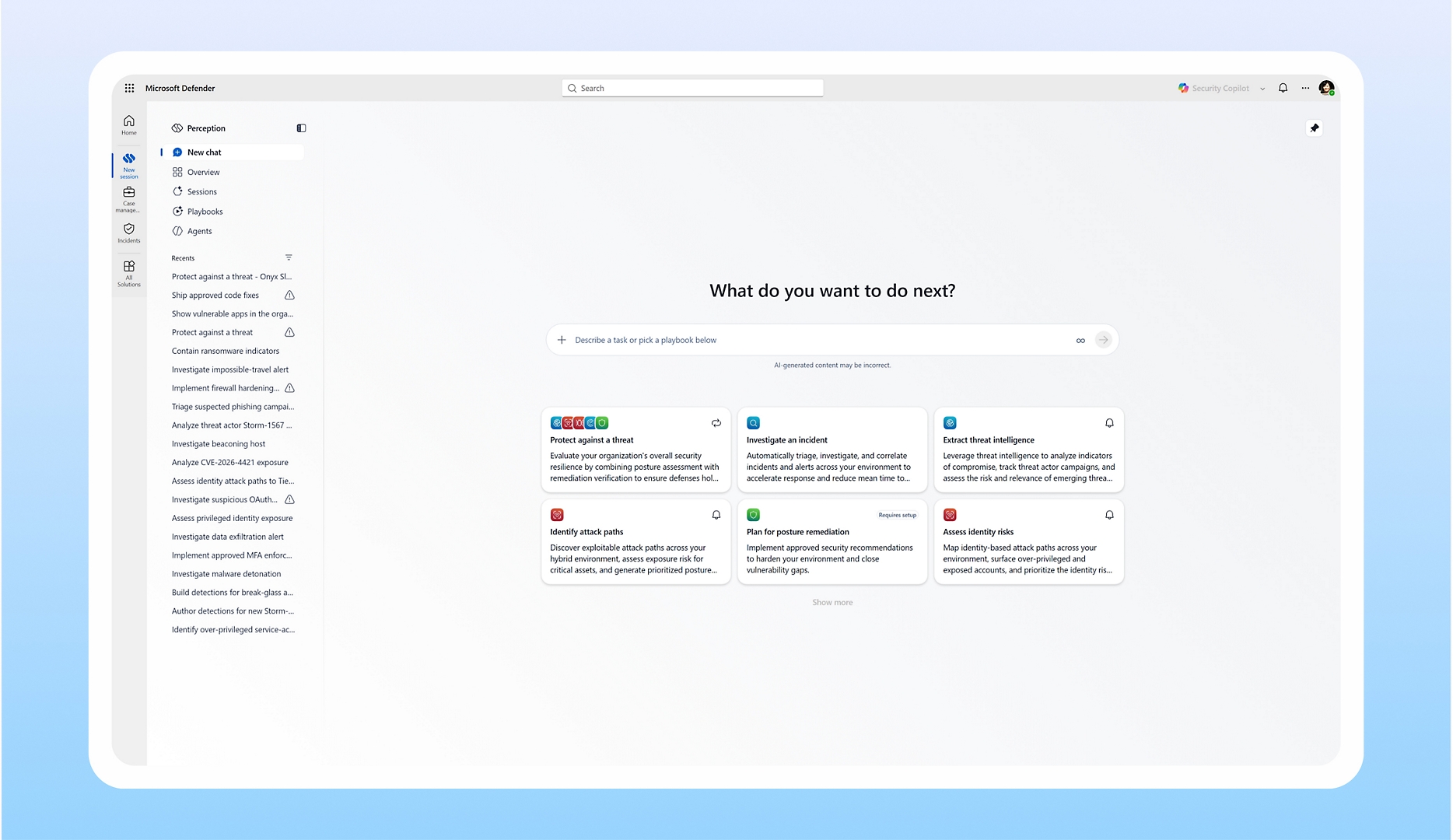
I contributed early, foundational design work on the interaction model. Two findings shaped it: coordination needed a shared, durable session — the same “revisitable artifact, not ephemeral chat” principle from the Intune agent work — not scattered, untraceable conversations. And security teams didn’t want to learn which specialized agent to open for a given task; they wanted to describe the goal and let the system route to the right one, with natural-language chat as the front door.
How far the system could act on its own, without a human re-approving every step, was the harder question. It doesn’t scale to sign off on individual actions across an entire security estate — but the fix wasn’t more automation with less oversight. It was moving where that oversight lives.
Approve every action individually
Approval-per-step works for one agent, one session — not a system meant to run continuously across multiple agents. Treated as a queue, it becomes exactly the bottleneck it was meant to remove.
Approve the strategy, not each step
Security teams approve the mission — what to watch for, what it’s allowed to act on. Review friction then scales with risk: clean actions get a single-click confirmation, flagged ones get escalated. Microsoft’s framing: “Strategy stays human. Scale becomes autonomous.”
Safety & Guardrail Flow
Risk-tiered response — review friction scales to severity, not a flat on/off for autonomy.
Incoming action
Script, policy change, or remediation request enters the pipeline.
Risk analysis
Agent evaluates harm potential, anomalies, and contextual signals.
Low risk
No risk detected
Signal is clean. Action is within expected parameters.
Review depth
Single-click approve
Admin sees a summary card — one button to approve.
Audit logged
Decision recorded with actor, timestamp, and context.
Action deployed
Proceeds immediately on approval.
Elevated
Risk detected
Anomaly or policy concern flagged. Human judgment required.
Review depth
Reasoning surface
Agent explains why this was flagged and what it found.
Full review form
Admin reads context, adds notes, approves or rejects.
Audit logged
Full reasoning chain and decision recorded.
Pending admin decision
Proceeds or is blocked based on the outcome.
High-risk
High-risk or destructive
Potentially catastrophic. Blocked immediately, escalated for review.
Review depth
Auto-block
Action is halted before any effect takes place.
Escalated review
Routed to a senior admin with full context and diff.
Threshold check
Configurable rules can pre-authorize known-safe destructive ops.
Audit logged
Block reason, escalation chain, and final decision recorded.
Blocked until resolved
Only proceeds on explicit escalation approval.
A design exploration of mine, not a confirmed Perception mechanism — shown to illustrate the “strategy stays human” tradeoff above in more depth.
What shipped is a framework Microsoft can keep extending, not just three agent teams working one case. Underneath sits an orchestration layer that keeps every agent reliable and guided, so autonomy grows without losing the human checkpoint. Hosted in Microsoft Defender: Red probes like an attacker, Blue investigates like a responder, Green remediates — coordinated through one shared, auditable session instead of isolated chats.
Red, Blue, Green — Microsoft’s own framing for the three agent teams, not a naming convention I invented. Public preview, per Microsoft’s own announcement — microsoft.com/security/project-perception-agentic-system and the Official Microsoft Blog announcement.
Approval checkpoints throughout the workflow cost real friction — every one is a chance to pause a plan already in motion. I designed for it anyway: with several agents acting in sequence, the ability to intervene mattered more than a faster run. One approval up front would have been simpler, but asked for more trust than a brand-new system had earned.
This work started as a cross-platform initiative, not something scoped to Intune — so its scale and monitoring gaps were never just Intune’s to solve. Pushing the fix into the shared foundation strengthened what every product agent builds on, VRA included: solve the problem where you find it, then generalize it.
The ripple runs the other direction too: Perception’s continuous, proactive protection means a patch could land on an Intune admin’s own devices, approved by security, not by them. Pulling admins into that approval loop would recreate the same bottleneck ruled out in phase 03. My answer: configurable thresholds so an admin sets their own comfort level upfront, backed by the ability to audit and roll back after the fact.
A shared, durable session is worth the redesign cost once more than one agent touches an outcome — per-agent chat histories don’t hold up when agents hand off work.
Approval doesn’t have to mean stopping at every step — the harder, more valuable design problem is deciding which layer of the system the approval belongs at.
Patterns built for one product’s constraints often reveal gaps the wider system hasn’t hit yet — solve locally, then generalize, rather than waiting for someone else to find the same gap.