Provisioning Cloud PCs at Scale
Windows 365 made the Cloud PC a first-class Intune device, managed side by side with physical hardware — which meant inventing both a new state model and a way to provision by the thousand, not one at a time.
- Role
- Design Lead, Cloud PC admin UX
- Scope
- Provisioning at scale — device states, groups, licensing · 2020–2024
- Outcome
- A group-based provisioning model built to scale to thousands of devices at a time — the way enterprise deployment actually requires
Intune had never managed a virtual device the way it managed a physical one. Remote desktops existed before Windows 365, but as separate infrastructure with their own setup and tooling — not something that showed up in Intune’s own device list next to a laptop. Windows 365 changed that: Cloud PCs would be first-class Intune devices, governed by the same policies, compliance checks, and update rings as physical hardware, side by side in one console.
That integration was the whole selling point, but it exposed two problems Intune’s admin model had never had to solve. First, state: a physical device is either enrolled or it isn’t — a Cloud PC has to be created before it can be managed at all, and it moves through its own lifecycle on the way there, a dimension of state physical devices never needed. Second, scale: a physical device gets set up one at a time, by design. Cloud PCs couldn’t work that way — a single policy could need to bring a thousand of them online at once, and provisioning had to be designed for that from the start, not retrofitted onto a one-device-at-a-time model.
The first real finding was that a Windows 365 license is a per-user construct, the same as any other Microsoft 365 license — but provisioning couldn’t be a per-user operation if it needed to scale. The pattern that emerged was translating that individual license into a group-level operation: a policy targets a Microsoft Entra group, not a person, and Cloud PCs get created automatically for whoever is a licensed member. Scale stopped meaning “an admin repeats this workflow a thousand times” and started meaning “the system reacts to group membership.”
The second finding was that state needed its own vocabulary. A Cloud PC that’s mid-creation, one that provisioned with a warning, one sitting in a grace period after its user left the group — none of that mapped onto how Intune already talked about physical devices. I had to help define not just the screens, but the state model itself: what admins actually needed to know and act on at each stage of a Cloud PC’s life, working closely with engineering to get there.
The obvious starting point was the model Intune already had for physical devices: one admin, one device, one setup flow.
Provision and manage Cloud PC by Cloud PC
Mirroring physical-device enrollment meant an admin working through individual devices one at a time — a model physical hardware could support because devices arrived one at a time too. Cloud PCs don’t: a single provisioning policy could need to create hundreds of them at once, and per-device management would have made that impossible to operate at any real size.
Provision and manage through group assignment
A provisioning policy targets a Microsoft Entra group, not individual users or devices. Licenses, already a per-user construct, get translated into a group-level policy the moment they’re assigned — Cloud PCs are created, resized, and deprovisioned as group membership changes, not as a queue of individual admin actions.
A provisioning policy targets a group and carries the settings that scale with it — region, image, naming convention, language — so admins configure once per policy, not once per Cloud PC. Individual customization still had a place: device naming templates and per-user settings meant the system could scale by group while a Cloud PC (and the person using it) still felt configured for them, not mass-produced.
Guided scenarios shipped on top of this foundation — Windows 365 Boot, for instance, walks an admin through letting end users sign directly into their Cloud PC from a physical device, extending the life of aging hardware instead of replacing it. But the wizard was the visible layer; the group-and-state model underneath is what let it, and everything that came after, actually scale.
A Cloud PC’s State Lifecycle
The vocabulary physical devices never needed — what an admin sees at each stage, and what it means.
Provisioning
Cloud PC is being created. Not yet usable.
Provisioned
Ready and healthy. The steady state.
Provisioned with warning
Usable, but something needs the admin’s attention.
Grace period
User left the group — still accessible for a window before removal.
Deprovisioned
Grace period expired. The Cloud PC is gone.
Each state earned its place by answering one question — has this Cloud PC finished becoming a real, usable thing — not by borrowing Intune’s existing enrolled/not-enrolled vocabulary, which couldn’t tell an admin that.
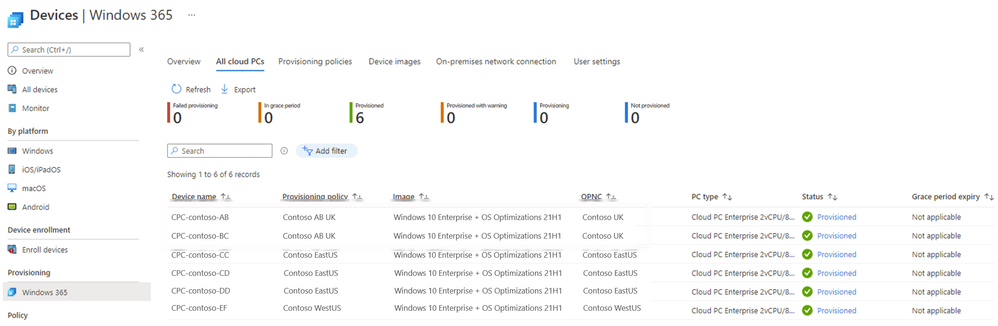
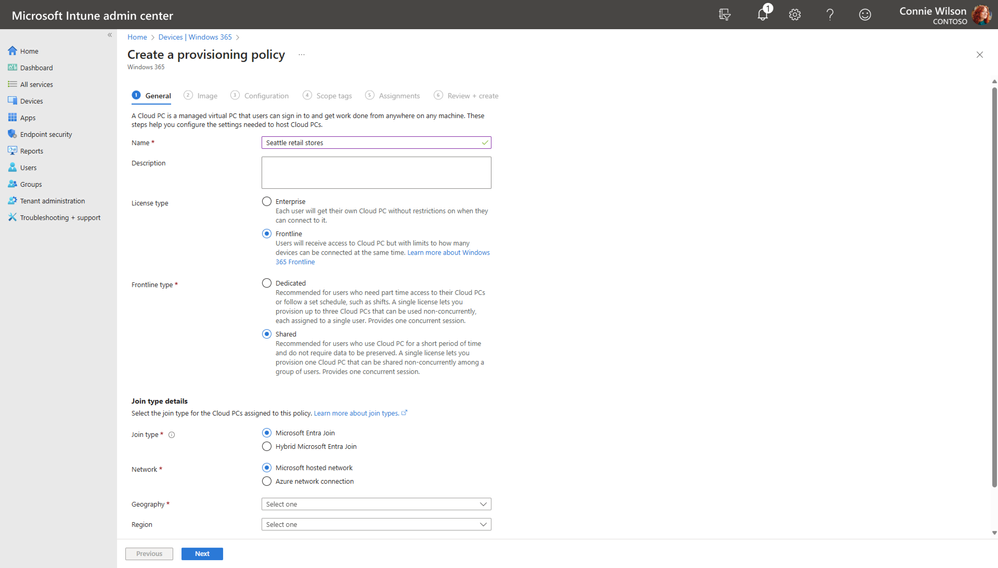
Shipped Windows 365 provisioning experiences, published by Microsoft — techcommunity.microsoft.com/windows-365-cloud-pc-provisioning-scenarios and windows-365-frontline-cloud-pc-in-shared-mode-quick-start-guide. Reference for the shipped admin surfaces.
Designing a genuinely new state model, instead of stretching Intune’s existing physical-device states to cover Cloud PCs too, cost more time working with engineering to define what each state meant and when it applied. Reusing existing states would have shipped faster, but it would have told an admin a Cloud PC was “enrolled” when what they actually needed to know was whether it had finished being created in the first place — a different question a reused vocabulary couldn’t answer.
I authored the “source of truth” design reference for Windows 365’s general-availability launch: every standard Intune pattern and Azure control used across the release, plus a full accessibility audit that documented every existing WCAG reflow issue — the kind of fit-and-finish work that doesn’t show up in a single feature but shapes how the whole launch holds together.
This body of work was part of what carried me to Principal Designer in late 2023.
A new device category doesn’t just need new screens — it can need an entirely new dimension of state, one the existing model never had to represent. Cloud PC’s provisioning lifecycle didn’t exist in Intune’s vocabulary until it was designed.
Scaling by group doesn’t mean abandoning individual configuration — naming templates and per-user settings let a system built for group-level scale still feel configured for the person using it, not mass-produced.
Find the constraint that won’t scale before you design around it — the moment provisioning stopped being a per-device operation and became a per-group one, everything downstream could scale with it.