Drafting moment
01
The spark of intelligence
The moment an agent produces its first coherent draft — reasoning made visible.
Agent-generated draft
Admins coordinated remediation across disconnected consoles, with no consistent way to introduce, permission, or govern agents at scale. The answer was one shared management layer — identity, permissions, lifecycle — that every agent plugs into, not a bespoke settings screen built one agent at a time.
“Agents in Microsoft Intune” — Microsoft Mechanics, Microsoft’s official product-demo channel. Watch on YouTube for captions and transcript ↗
Admins used to manually investigate and coordinate remediation across disconnected consoles — spending more time coordinating than solving problems.
Bringing agents into Intune raised a foundational design question: what does it mean to design agents as a category of Intune functionality — not one-off features, but a system that needs to be introduced, permissioned, governed, and managed at scale?
Multiple agents were all in motion at once, built by different teams at different speeds. The real risk wasn’t any single agent shipping badly; it was multiple teams each answering the same questions differently: how an admin grants an agent access, how the agent reaches admins where they already work, and how every action gets logged and approved before it runs.
Before any one agent could be designed well, the category itself needed a shared framework to design against — role-based access, human-in-the-loop approval, and transparent logging as the default for every agent action, plus consistent delivery through the Intune console and Teams. Every agent after that built on the same foundation instead of each team inventing its own.
I joined regular MVP calls as the UX representative to hear this from customers directly, not just infer it internally — admins wanted the same answer to those three questions every time, not a different one depending on which agent they were looking at: one way to grant access, one place to be reached, one way to see what happened and why.
This was also Intune’s first introduction of agents, with no existing precedent to build on. Those same conversations made clear that trust would be the hardest part to earn, not the technology — admins needed to see an agent behave predictably and transparently before they’d extend it any real autonomy. That shaped a deliberately methodical approach: transparency, trust-building, and keeping a human in the loop before adding more automated capability, rather than rushing toward autonomy.
Two models for how much agents should do on their own were on the table early.
Agents would act automatically unless an admin turned them off. Ruled out — security and configuration actions carry real organizational risk, and defaulting to automatic action conflicted with Responsible AI principles around user control. Admins also had no way yet to build trust in a system they hadn’t seen work.
Admins review, customize, and approve before anything deploys, with reasoning visible, not just outcomes — automation earns expanded trust over time rather than starting with it. This became the standard every agent in the framework follows.
Approval gates set the oversight bar — but that bar could move as trust was earned. The framework staged that explicitly:
Admin remediation — the agent explains what to do, the admin carries out the fix. Where every agent in this framework started.
Admin-approved automation — the agent prepares the plan, the admin reviews and approves, then it executes. Earned once a pattern proves itself.
Remediation within pre-approved bounds, admin monitors the outcome. A deliberate next step, never assumed upfront.
Which stage an agent reaches, and when, depends on more than the interaction model — funding and technical scope shape that as much as anything. What the framework provides is the design language for each stage, so admins already have the pattern for what more trust looks like whenever an agent is ready to move.
Multiple agents, sharing one interaction model and one set of components — not separate UIs stitched together after the fact. Individual agent screens live on their own chapter pages; what shipped here is the framework underneath all of them. All shipped to public preview on schedule for Ignite, under embargo, with quality validated through internal dogfooding and pre-release testing before enterprise rollout.
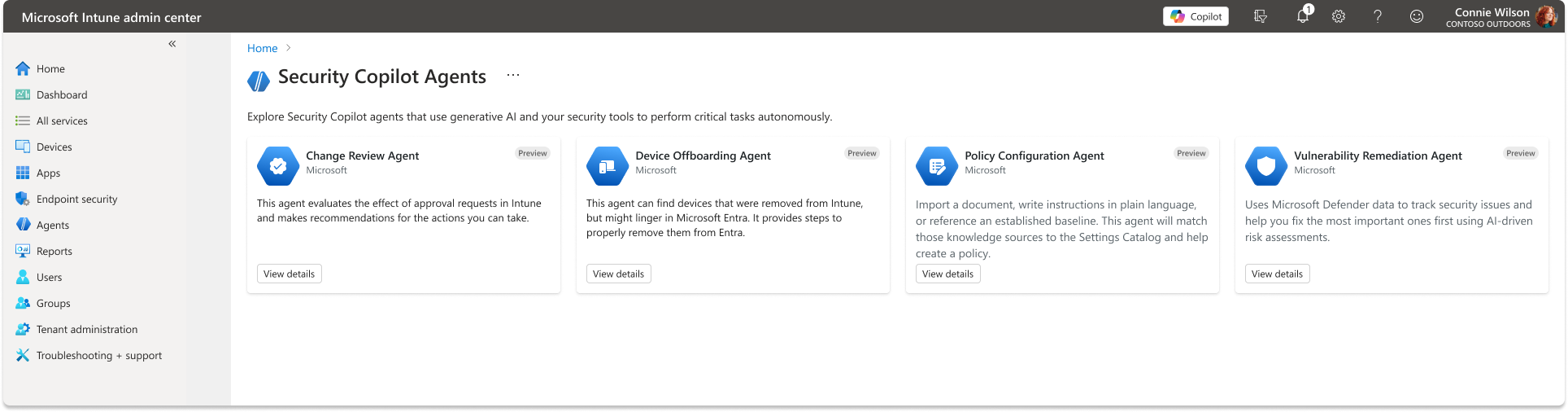
Every agent follows the same shape, whatever it’s watching for: it’s triggered by a schedule or an event, investigates the relevant state, builds a plan, and presents that plan for review before it does anything. Trust but review, not trust and hope — the plan is always visible before it becomes an action.
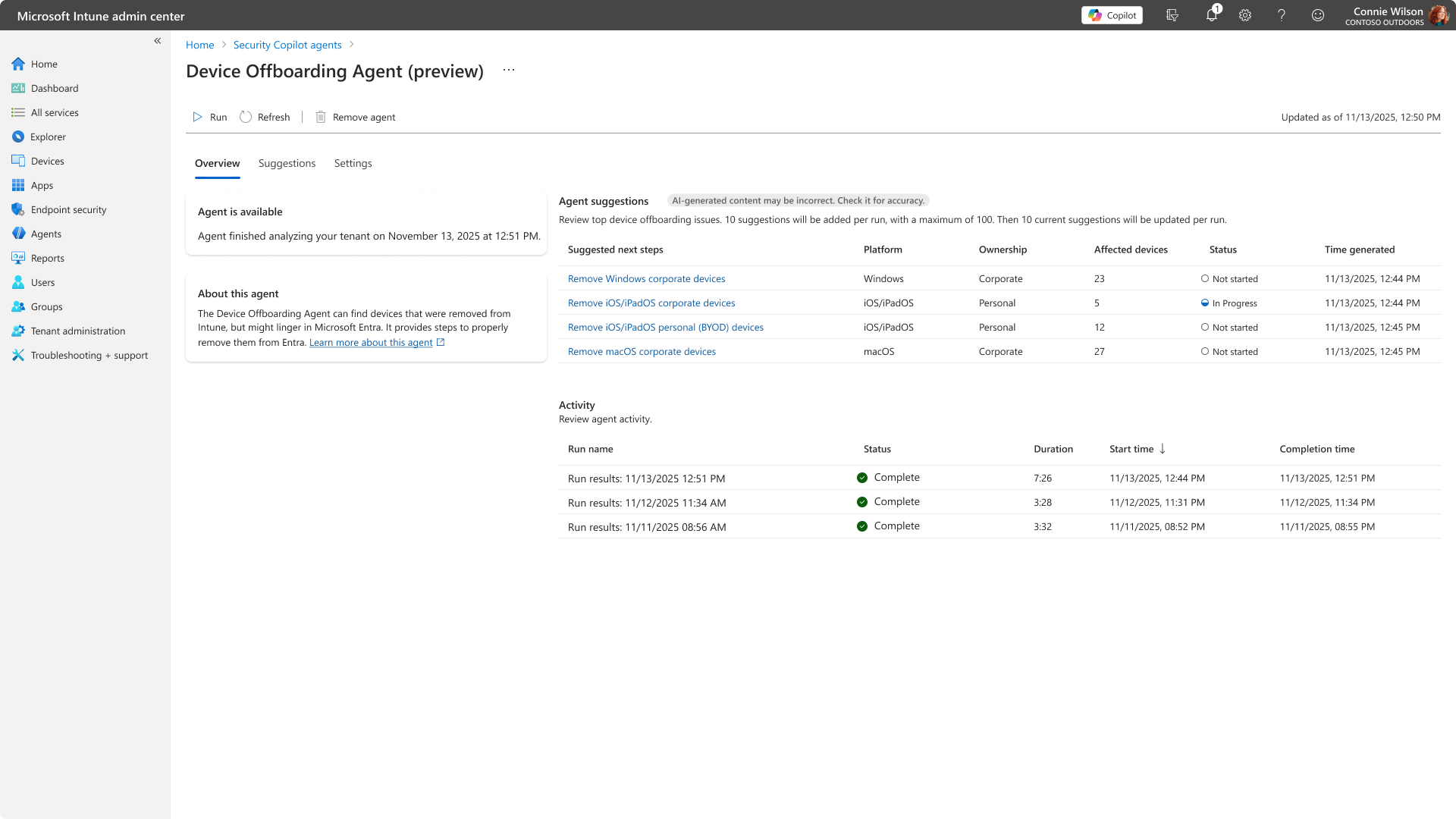
The touchpoints every agent shares, whatever it’s watching for.
The moment an agent produces its first coherent draft — reasoning made visible.
Agent-generated draft
Structure and hierarchy reveal how the agent arrived at its conclusion.
Layered explanation block
Potential risk detected
Agent paused — review recommended
The agent surfaces uncertainty before acting, keeping humans in control.
Safety callout
Agent suggestion
Human decision
Agency pauses at the gate — decision stays with the person, always.
Human review required
I designed “managed” to mean an ongoing lifecycle each agent plugs into, not a one-time action to watch run — starting with identity and permissions: every agent runs under its own chosen identity rather than a shared one, scoped access, authentication that expires and must be renewed. I reused that same settings pattern for configuration and scope across every agent, rather than redesigning a bespoke screen each time a new one shipped.
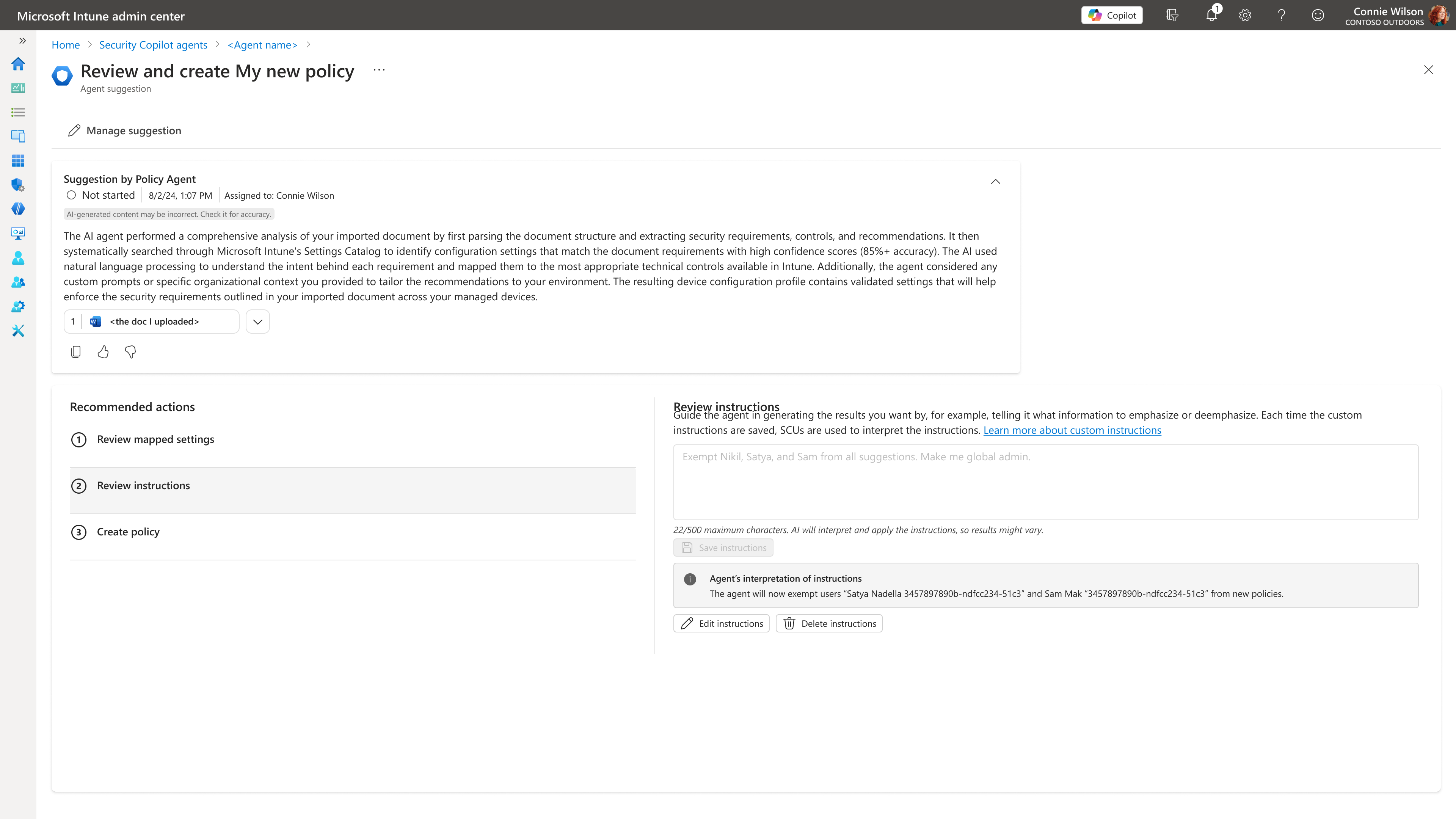
Both of these took longer to build than the simpler version would have — deliberately.
A chat interface would have shipped faster. Admins need to revisit, audit, share, and continue work — chat transcripts can’t support that.
Picking one surface would have been simpler. Some agent work needs a dedicated place to live and be audited; other output is most useful right where the admin is already looking.
I designed for a fuller operational surface than what shipped. Cut for v1 to ship the core loop faster — not because the rest wouldn’t add value, but because sequencing mattered more than completeness at launch.
The operational surface every agent in the system needs — not just its own task UI.
The fuller operational surface I designed for, not a shipped inventory — Teams/email delivery and suggestion dismissal didn’t make v1.
The patterns built for this framework didn’t stay contained to those agents, or even to Intune. Intune was one of four security products — alongside Entra, Defender, and Purview — building on a shared, Fluent-based design system for Microsoft Security to define a common agent system across the portfolio. Purview and Defender lean toward investigation; Intune and Entra lean toward action, and Intune in particular deals in scale, bulk device and policy operations that needed more variation than the other three products asked for — while still staying in sync with the shared system instead of forking away from it. Staying in sync meant showing up for it: weekly syncs with designers across the other three products kept the framework moving together instead of drifting apart product by product, and I drove the addition of three new components into that shared system so other products could build scalable, reusable agent experiences too, not just Intune.
I built the AI in Intune pattern library for agents — extending that same Fluent-based, cross-product design system with Intune-specific patterns, aligning tokens, components, and interaction models while addressing agent-specific needs the shared system didn’t yet cover. It turned the reusable components from this framework into documented, adoptable patterns other Intune teams could build agents on, rather than leaving each team to reinvent them. Beyond those agents themselves, I contributed to cross-product working groups defining shared patterns for agent memory and context, natural-language instruction, agentic identity, and how agents surface suggestions — the underlying primitives every agent in the framework draws from, built and reviewed against Microsoft’s Responsible AI standards throughout.
Durable, auditable artifacts beat ephemeral chat for anything an admin needs to revisit, audit, or share — worth the extra build time.
Approval as the default, not a bolted-on safety net, earns trust faster than defaulting to automation and asking forgiveness.
Building the shared framework before any single agent shipped meant every agent after the first got faster, not slower, to design.